
- You are here:
- Home
- Support
- InPrint 2
- Common Questions
- F12 not working
 InPrint 2
Contact Widgit
Email: support@widgit.com
Tel: 01926 333680
-
 Support for InPrint 2 ended on 31st July 2020. Why has support ended? What are my options?
Why has support ended?
InPrint 2 was originally released in 2002 and has not been updated since it was replaced by InPrint 3 in 2016.We are committed to providing you with the best support and user experience possible, however, as older operating systems are retired it becomes increasingly difficult to provide the level of support and user experience you have come to expect from us.
Therefore, we ended support for InPrint 2 (UK) on 31st July 2020 to focus on delivering improvements and bug fixes to our existing product range, which includes InPrint 3.
What are my options?
InPrint 3 was released as a direct replacement for InPrint 2 in 2016. It comes with a massively improved easy-to-use interface and 100s of ready-made templates allowing you to create visual supports in minutes.
Common Questions
 The F12 key doesn't seem to work?
 Solution
We have had to change the F12 key for a number of reasons. InPrint 2 uses the F9 key, although you can also click on your choice because the symbols are displayed in the Symbol Choices window.
Click in a word (in either a text or symbol writing frame) to see the symbol choices displayed at the bottom of the Edit panel.
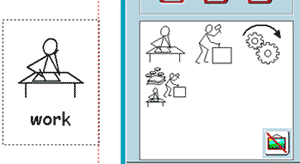
You can also turn off the symbol using the 'Hide symbol' button inside the symbol choices window.
